JavaScript Modules: Import and Export Explained

Section 01
Why do we even need modules?
Imagine you're cooking a big dinner. You don't throw every ingredient into one massive pot and stir wildly — you prepare components separately. The sauce is made in one pan, the pasta in another, the garlic bread in the oven. Then you bring it all together.
"Modules are to JavaScript what separate pots and pans are to cooking — they let you work on one thing at a time, cleanly."
Without modules, older JavaScript was just one big file. Or worse — several script tags that all shared the same global namespace. That means a variable called data in one file could silently overwrite data in another. Chaos.
Here's what a messy, no-modules world looks like:
index.html — the old, chaotic way
<!-- ALL your JavaScript in one enormous file -->
<script src="everything.js"></script>

// everything.js — 2000+ lines of mixed concerns
var data = "user data";       // 😬 global variable
var data = "product data";    // 💥 oops, silently overwritten!

function calculateTotal() { ... }
function renderUI() { ... }
function fetchUser() { ... }
// ...1,900 more lines...
⚠️ The biggest problem here is naming collisions and zero encapsulation. Any variable or function you define is exposed to every other piece of code — even code you didn't write (like a third-party library). Things break in mysterious ways.
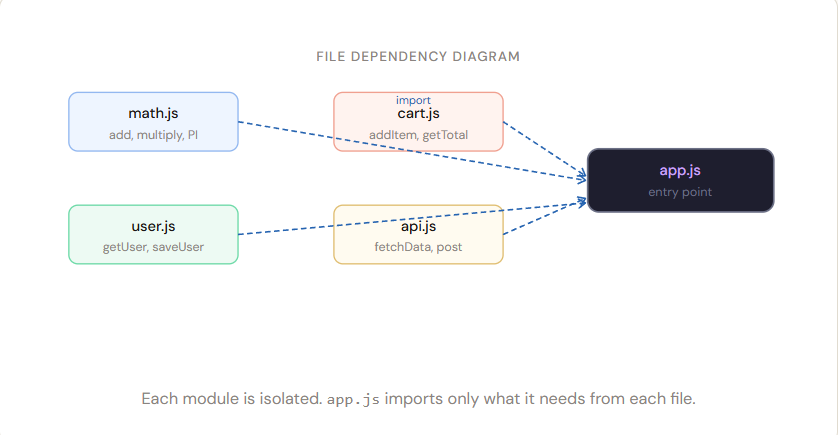
Modules solve this by giving each file its own private scope. Nothing leaks out unless you explicitly choose to export it.
Section 02
Exporting — sharing your code
Think of a module as a shop. By default, everything inside is private — the staff kitchen, the storage room. But you put certain things in the window display so customers can see them. That's what export does: it puts your functions and values on display.
There are two ways to export: named exports and default exports. Let's look at named first:
math.js — named exports
// ✅ Export individual functions by name
export function add(a, b) {
  return a + b;
}

export function multiply(a, b) {
  return a * b;
}

export const PI = 3.14159;

// ❌ This is NOT exported — completely private to this file
const secret = "internal helper";
You can also collect all your exports in one place at the bottom of the file — many developers prefer this because it gives you a clear "table of contents" of what the module exposes:
math.js — grouped export style
function add(a, b) { return a + b; }
function multiply(a, b) { return a * b; }
const PI = 3.14159;
const secret = "private"; // stays inside

// 👇 Everything you're sharing, listed clearly at the end
export { add, multiply, PI };
Grouping exports at the bottom is great for readability — anyone reading your file can scroll straight to the end and know exactly what this module offers, like an index page.
Now for default export. Every module can have at most one default export. It's for when your module is mainly about one thing:
greet.js — default export
// This module's whole purpose is the greet function
export default function greet(name) {
  return `Hello, ${name}! Welcome aboard.`;
}

// Or export an object, a class, anything really:
// export default class UserService { ... }
// export default { baseURL: '/api', timeout: 3000 };
Section 0
3 Importing — using someone else's code
Importing is the other half of the conversation. If exporting is putting items in the shop window, importing is walking in and picking them up.
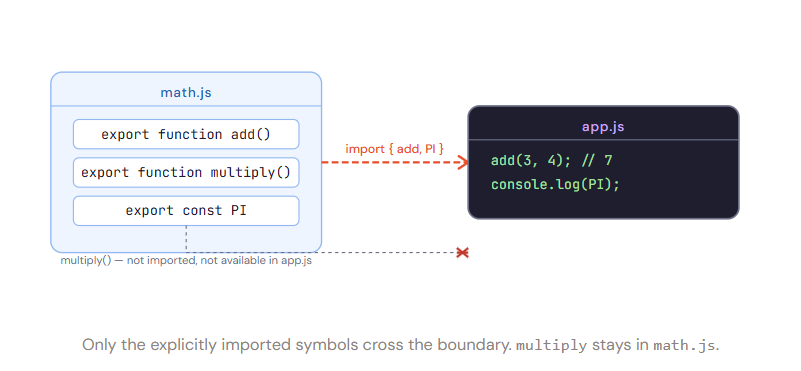
To import named exports, you use curly braces { } — think of them as a "pick list":
app.js — importing named exports
// 📦 Import specific things you need
import { add, PI } from './math.js';

console.log(add(3, 4));  // 7
console.log(PI);        // 3.14159

// You can also rename what you import (aliasing)
import { multiply as times } from './math.js';
console.log(times(4, 5));  // 20, using your own name
To import a default export, there are no curly braces — and you can name it whatever you want:
app.js — importing a default export
// No curly braces for default imports!
import greet from './greet.js';

// You can name it anything you like:
import sayHello from './greet.js';   // also valid ✅
import welcome  from './greet.js';   // also valid ✅

console.log(greet('Priya'));  // Hello, Priya! Welcome aboard.
You can even mix default and named imports from the same file in one go:
app.js — mixing default + named
// config.js exports a default object AND named constants
import config, { VERSION, DEBUG } from './config.js';
//     ↑ default      ↑ named exports

console.log(config.baseURL);  // from the default export
console.log(VERSION);         // from a named export
Section 04
Default vs Named exports
This is where most beginners get confused. Let's settle it with a simple rule of thumb:
"Use default export when the module is about one main thing. Use named exports when the module has several things to offer."
| Feature | Named Export | Default Export |
|---|---|---|
| Syntax (export) | export function add() |
export default function() |
| Syntax (import) | import { add } from ... |
import add from ... |
| How many per file? | Unlimited | Only one |
| Must use exact name? | Yes (or alias with as) | No — name it anything |
| Best for | Utility libraries, helpers, constants | Single class, main component, config object |
| Real-world example | import { useState } from 'react' |
import React from 'react' |
Pro tip: In React, each component file typically has a single default export (the component itself) and maybe a few named exports (types, helpers, sub-components). That's a great pattern to follow.
UserCard.jsx — real-world React pattern
// Named export — a helper and a type/constant
export const ROLES = { ADMIN: 'admin', USER: 'user' };
export function formatName(first, last) {
  return `\({last}, \){first}`;
}

// Default export — the main thing this file is about
export default function UserCard({ user }) {
  return (
    <div className="card">
      <h2>{formatName(user.first, user.last)}</h2>
      <span>{user.role}</span>
    </div>
  );
}
App.jsx — consuming both export types
// Default + named in one import line
import UserCard, { ROLES, formatName } from './UserCard';

const user = {
  first: 'Priya',
  last:  'Sharma',
  role:  ROLES.ADMIN
};

// Use all three things we imported
console.log(formatName(user.first, user.last)); // Sharma, Priya
// <UserCard user={user} /> renders the component
Section 05
Benefits of modular code
At this point you might be thinking: "okay, but is it really worth the extra syntax?" Yes. Absolutely. Here's why modular code makes you a better developer:
🔒 Encapsulation Each module has its own private scope. Internal variables can't accidentally interfere with other parts of your app.
♻️ Reusability Write a formatDate function once, import it everywhere. No copy-pasting, no inconsistency.
🧪 Testability Isolated modules are easy to unit test. Import just the function you want to test — no app startup required.
🗂️ Organisation Related code lives together. auth.js handles auth. api.js handles requests. Readable, scalable.
👥 Team collaboration Multiple developers can work on different modules simultaneously without stepping on each other's toes.
⚡ Tree-shaking ready Bundlers like Vite and Webpack can remove unused exports, making your production bundle smaller and faster.
💡 A good rule of thumb: if a file grows beyond ~200 lines, it's probably doing too many things. Split it into focused modules. Your future self will thank you.
cheatsheet.js — everything in one place
// ─── EXPORTING ───────────────────────────────────────

// Named export (inline)
export const PI = 3.14;
export function add(a, b) { return a + b; }

// Named export (grouped)
export { add, PI };

// Default export
export default function main() { ... }

// Re-export from another module
export { add } from './math.js';


// ─── IMPORTING ───────────────────────────────────────

// Named import
import { add, PI } from './math.js';

// Named import with alias
import { add as sum } from './math.js';

// Default import
import main from './main.js';

// Default + named together
import main, { add, PI } from './combined.js';

// Import everything as a namespace object
import * as MathUtils from './math.js';
MathUtils.add(2, 3); // 5


