JavaScript Arrays 101

Before arrays, storing multiple values was a mess. After arrays, it's just one clean line of code.
concept
Imagine you need to store the marks of 5 students. Without arrays, you'd create 5 separate variables — mark1, mark2, mark3... you get the idea. That's already painful. Now imagine 100 students.
An array solves this by storing a collection of values in a single variable, in a specific order. Think of it like a row of lockers — each locker has a number on it, and you can put anything inside.
Without arrays — painful
let mark1 = 85;
let mark2 = 92;
let mark3 = 78;
let mark4 = 90;
let mark5 = 65;
// Imagine 100 students...
With arrays — clean
let marks = [85, 92, 78, 90, 65];

// 100 students? Same idea.
// Still just one variable.
ⓘAn array can hold any type of value — numbers, strings, even a mix of both. JavaScript doesn't restrict you.
How to create an array
Creating an array is as simple as using square brackets [ ] and separating values with commas. That's the whole trick.
creating-arrays.js
// An array of fruits
const fruits = ['apple', 'banana', 'mango'];

// An array of numbers (student marks)
const marks = [85, 92, 78, 90];

// An empty array (you can fill it later)
const tasks = [];

// Mixed types — totally valid in JavaScript
const mixed = ['Riya', 21, true];
💡Use const for arrays by default. It doesn't mean the array is frozen — you can still add or change items. It just means you can't replace the whole array with a different one.
Accessing elements — and why it starts at 0
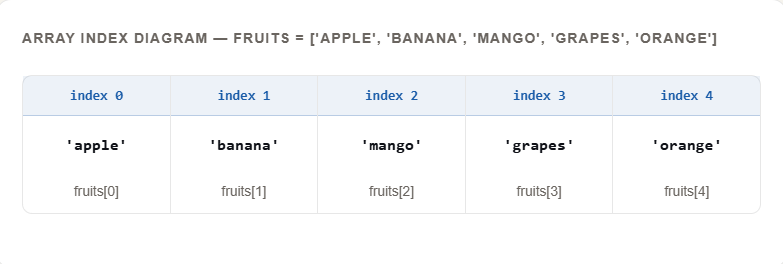
Every item in an array has an index — a position number that starts from 0, not 1. This trips up almost every beginner, so let's make it really clear.
The first item is at index 0, the second at 1, the third at 2, and so on. To access an item, you write the array name followed by the index in square brackets.
accessing.js
const fruits = ['apple', 'banana', 'mango', 'grapes', 'orange'];

// First item — index 0
console.log(fruits[0]); // 'apple'

// Third item — index 2
console.log(fruits[2]); // 'mango'

// Last item — index 4 (length - 1)
console.log(fruits[4]); // 'orange'

// Accessing an index that doesn't exist
console.log(fruits[10]); // undefined
ⓘWhy does it start at 0? Computers count from 0 because the index actually represents the offset from the start. The first item is 0 steps away from the beginning. It's a computer science thing — you get used to it quickly.
Updating elements
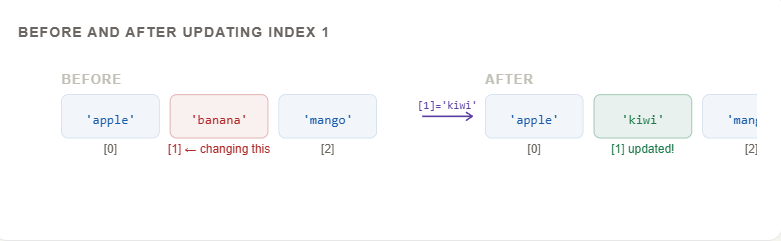
Updating an item in an array is just like accessing it — you use the index — except you assign a new value to that position. Done.
updating.js
const fruits = ['apple', 'banana', 'mango'];

// Let's change 'banana' to 'kiwi'
fruits[1] = 'kiwi';

console.log(fruits);
// ['apple', 'kiwi', 'mango']

// Update the last item
fruits[2] = 'papaya';

console.log(fruits);
// ['apple', 'kiwi', 'papaya']
The length property
Every array has a .length property that tells you how many items are in it. It's not a method (no parentheses needed) — just a simple property you can read anytime.
length.js
const fruits = ['apple', 'banana', 'mango', 'grapes'];

console.log(fruits.length); // 4

// Handy trick: get the last item without knowing the exact index
const lastItem = fruits[fruits.length - 1];
console.log(lastItem); // 'grapes'

// Why length - 1? Because index starts at 0.
// 4 items → indices are 0, 1, 2, 3 → last is 4-1 = 3
💡The fruits.length - 1 trick for the last item is something you'll use constantly. Burn it into memory.
Looping over arrays
What's the point of storing 100 values if you have to access each one manually? Loops let you go through every item in an array automatically — one by one — and do something with each.
There are two common ways. The classic for loop gives you full control. The modern for...of loop is cleaner when you just need the values.
Classic for loop
const fruits = ['apple', 'banana', 'mango'];

for (let i = 0; i < fruits.length; i++) {
  console.log(fruits[i]);
}
// apple
// banana
// mango
Modern for...of loop
const fruits = ['apple', 'banana', 'mango'];

for (let fruit of fruits) {
  console.log(fruit);
}
// apple
// banana
// mango
real-world-loop.js — printing all student marks with index
const marks = [85, 92, 78, 90, 65];

for (let i = 0; i < marks.length; i++) {
  console.log(`Student \({i + 1}: \){marks[i]} marks`);
}

// Student 1: 85 marks
// Student 2: 92 marks
// Student 3: 78 marks
// Student 4: 90 marks
// Student 5: 65 marks
Use for...of when you just need each value. Use the classic for loop when you need the index number too (like "Student 1, Student 2...")
Your Assignment
Open your browser console (press F12 → click Console) and write this from scratch.
1Create an array called movies with 5 of your favourite films as strings.
2Print the first movie using index 0. Print the last using movies.length - 1.
3Change the movie at index 2 to a different film. Print the whole array.
4Use a for loop to print every movie with its position number (1 through 5).
5Bonus: Try using for...of instead and notice the difference.
assignment-solution.js — try on your own first!
// Step 1
const movies = ['Inception', 'Interstellar', 'The Dark Knight', 'Dune', 'Oppenheimer'];

// Step 2 — first and last
console.log(movies[0]);                     // 'Inception'
console.log(movies[movies.length - 1]);  // 'Oppenheimer'

// Step 3 — update index 2
movies[2] = 'The Prestige';
console.log(movies);
// ['Inception', 'Interstellar', 'The Prestige', 'Dune', 'Oppenheimer']

// Step 4 — loop with position
for (let i = 0; i < movies.length; i++) {
  console.log(`\({i + 1}. \){movies[i]}`);
}
// 1. Inception
// 2. Interstellar  ... and so on
Arrays are the foundation of almost everything in JavaScript. Once this feels comfortable, you're ready to explore the array methods that make them truly powerful.


