Control Flow in JavaScript: If, Else, and Switch Explained
So far your programs have run line by line, top to bottom, doing the same thing every time. Real programs are not like that. They check conditions, make decisions, and take different paths. That is control flow — and it starts with if.
What is Control Flow?
Control flow is the order in which a computer executes the statements in a program. By default, code runs sequentially — line 1, then line 2, then line 3. Control flow statements let you change that sequence based on conditions.
Real-life analogy
Every morning you make decisions without thinking about it. If it is raining, you take an umbrella. If you are running late, you skip breakfast. Otherwise, you follow your normal routine. Control flow in code works exactly the same way — it lets your program respond differently to different situations.
Without control flow, every program would do the same thing every time it ran, regardless of the input. Control flow is what makes programs actually useful.
The if Statement
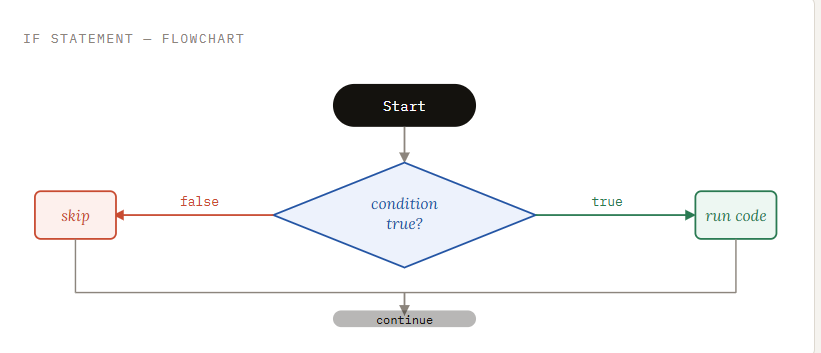
The if statement is the simplest form of control flow. It runs a block of code only when a condition is true. If the condition is false, the block is skipped entirely.
syntax
if (condition) {
  // This code runs only if condition is true
}
Here is a concrete example. A user must be at least 18 to access a page:
javascript
let age = 20;

if (age >= 18) {
  console.log("Access granted.");
}

// age is 20, which is >= 18, so this prints: "Access granted."
// If age were 15, nothing would print at all.
How it runs, step by step
JavaScript evaluates the condition inside the parentheses. If it is true, the code inside the curly braces runs. If it is false, JavaScript skips the entire block and moves on to whatever comes next.
The if-else Statement
Sometimes you want to do one thing if a condition is true, and something else if it is false. That is exactly what if-else is for — it provides a fallback path.
syntax
if (condition) {
  // Runs when condition is true
} else {
  // Runs when condition is false
}
Extending the earlier example — now we handle both cases:
javascript
let age = 16;

if (age >= 18) {
  console.log("Access granted.");
} else {
  console.log("You must be 18 or older.");
}

// age is 16, which is NOT >= 18
// Output: "You must be 18 or older."
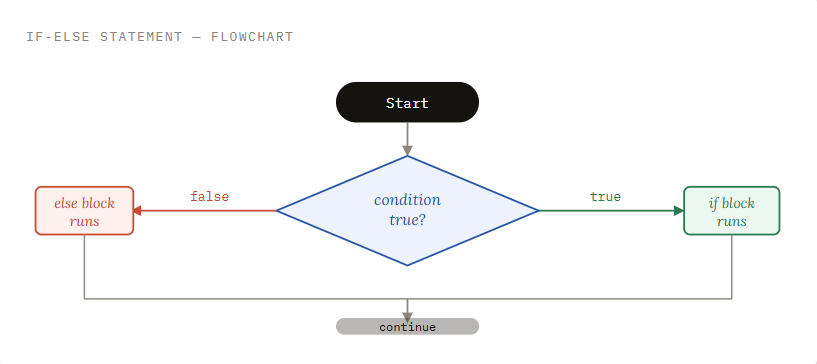
One of the two blocks will always run. Either the if block or the else block — never both, never neither.
The else if Ladder
When you have more than two possible outcomes, you chain conditions together using else if. JavaScript checks each condition from top to bottom and runs the first block whose condition is true. All the rest are skipped.
syntax
if (condition1) {
  // Runs if condition1 is true
} else if (condition2) {
  // Runs if condition1 is false AND condition2 is true
} else if (condition3) {
  // Runs if conditions 1 and 2 are false AND condition3 is true
} else {
  // Runs if none of the above conditions were true
}
A practical example — grading a student's marks:
javascript
let marks = 72;

if (marks >= 90) {
  console.log("Grade: A");
} else if (marks >= 75) {
  console.log("Grade: B");
} else if (marks >= 60) {
  console.log("Grade: C");
} else if (marks >= 40) {
  console.log("Grade: D");
} else {
  console.log("Result: Fail");
}

// marks is 72
// 72 >= 90? No. 72 >= 75? No. 72 >= 60? Yes.
// Output: "Grade: C"
How it runs, step by step
JavaScript checks marks >= 90 — false, skip. Then marks >= 75 — false, skip. Then marks >= 60 — true, run this block, stop. The remaining conditions are never even evaluated. Order matters here.
Common mistake
If you wrote the conditions in the wrong order — for example, checking >= 40 before >= 60 — a student with 72 marks would get Grade D, which is wrong. Always write the most specific (highest) condition first.
The switch Statement
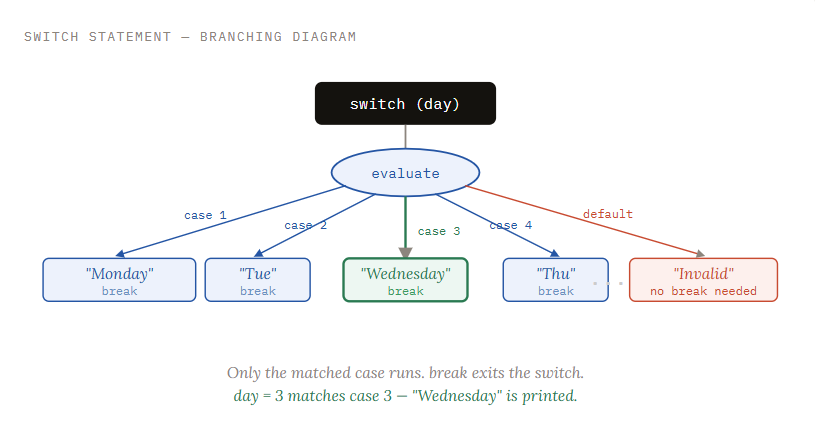
The switch statement is designed for situations where you are checking one variable against many specific values. Instead of a chain of else if blocks, you list each possible value as a case.
syntax
switch (expression) {
  case value1:
    // Runs when expression === value1
    break;
  case value2:
    // Runs when expression === value2
    break;
  default:
    // Runs when no case matched
}
Here is a real example — printing the day of the week from a number:
javascript
let day = 3;

switch (day) {
  case 1:
    console.log("Monday");
    break;
  case 2:
    console.log("Tuesday");
    break;
  case 3:
    console.log("Wednesday");
    break;
  case 4:
    console.log("Thursday");
    break;
  case 5:
    console.log("Friday");
    break;
  case 6:
    console.log("Saturday");
    break;
  case 7:
    console.log("Sunday");
    break;
  default:
    console.log("Invalid day number.");
}

// day is 3, which matches case 3
// Output: "Wednesday"
The role of break
The break keyword is critical inside a switch statement. Without it, JavaScript does not stop at the matched case — it continues running into every case below it, one after another, until it hits a break or the end of the switch. This is called fall-through.
javascript — what happens WITHOUT break
let day = 2;

switch (day) {
  case 1:
    console.log("Monday");
  case 2:
    console.log("Tuesday");  // Matches here...
  case 3:
    console.log("Wednesday"); // ...but falls through to here
  case 4:
    console.log("Thursday");  // ...and here
}

// Output (wrong!):
// "Tuesday"
// "Wednesday"
// "Thursday"
Always add break
Always end each case with break unless you have a specific reason for fall-through. Forgetting break is one of the most common bugs beginners introduce when writing switch statements.
The default case
The default block runs when no case matches the expression. It is equivalent to the final else in an if-else ladder. It is optional, but it is good practice to always include it so your switch handles unexpected values gracefully.
When to Use switch vs if-else
Both structures handle conditional logic, but they are suited to different situations. Here is a clear way to decide which one to reach for:
| Situation | Use |
|---|---|
Checking ranges or comparisons (>= 90, < 18) |
if-else |
| Checking one variable against many exact values | switch |
| Only two outcomes (true or false) | if-else |
| Five or more specific cases (days, months, menu options) | switch |
| Conditions involve multiple variables | if-else |
| All conditions check the same single variable | switch |
A practical rule: if you find yourself writing an else if ladder where every condition is variable === someValue, that is a strong signal to switch to switch. It will be cleaner and easier to read.
Note on strict equality
The switch statement uses strict equality (===) to match cases. This means both the value and the type must match. switch(1) will not match case "1" because one is a number and the other is a string.
Practice Assignment
Two programs to write
Program 1 — Positive, negative, or zero
Write a program that checks a number and prints whether it is positive, negative, or zero. Use an if-else if-else chain.
javascript — solution
let number = -7;

if (number > 0) {
  console.log("The number is positive.");
} else if (number < 0) {
  console.log("The number is negative.");
} else {
  console.log("The number is zero.");
}

// Output: "The number is negative."
Program 2 — Day of the week
Write a program that takes a number from 1 to 7 and prints the corresponding day. Use a switch statement.
javascript — solution
let dayNumber = 5;

switch (dayNumber) {
  case 1: console.log("Monday");    break;
  case 2: console.log("Tuesday");   break;
  case 3: console.log("Wednesday"); break;
  case 4: console.log("Thursday");  break;
  case 5: console.log("Friday");    break;
  case 6: console.log("Saturday");  break;
  case 7: console.log("Sunday");    break;
  default: console.log("Enter a number between 1 and 7.");
}

// Output: "Friday"
Why these choices?
Program 1 uses if-else because the conditions involve comparisons (> 0, < 0) — not exact value matching. switch cannot handle range checks. Program 2 uses switch because we are checking a single variable against a list of specific, known values — exactly the case where switch is cleaner than a long else if chain.
Summary
Control flow determines which parts of your code run based on conditions
ifruns a block when a condition is true, and skips it when falseif-elsealways runs one of two blocks — the condition decides whichelse ifchains let you handle multiple conditions in order; the first true one winsswitchcompares one expression against multiple exact values; always addbreakafter each caseUse
if-elsefor comparisons and ranges. Useswitchwhen matching one variable against several specific values


