Array Flatten in JavaScript

Section 01
What is a nested array?
A normal array is a list of values. A nested array is an array that contains other arrays inside it — like a box of boxes.
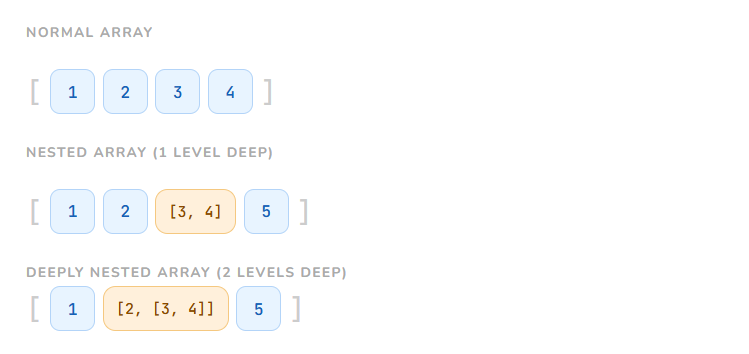
🍱Think of it like a lunch box with smaller boxes inside. The lunch box holds a sandwich box, and inside that sandwich box is the actual food.
Section 02
Why do we flatten arrays?
Sometimes data comes to you messy — nested and grouped. But to loop over every single value, or pass data to a function, you need everything in one flat list.
1 API responses
A backend sends you [[user1, user2], [user3, user4]] — paginated in groups. You want one clean list.
2 Combining results
You ran a search across multiple categories, each returning an array. Now combine them into one results list.
3 Easier processing
.map(), .filter(), and .reduce() all work on a flat array. Nested arrays need to be unwrapped first.
Section 03
What does "flattening" actually mean?
Flattening means taking all the values out of the inner arrays and putting them into one single array. Like emptying all the small boxes into one big tray.
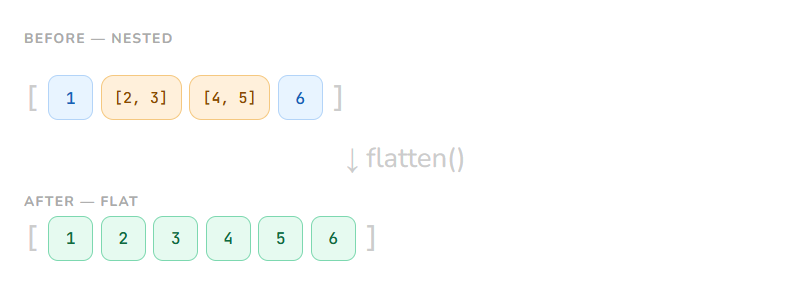
The inner arrays [2, 3] and [4, 5] got "opened up" and their values joined the outer array. Simple as that.
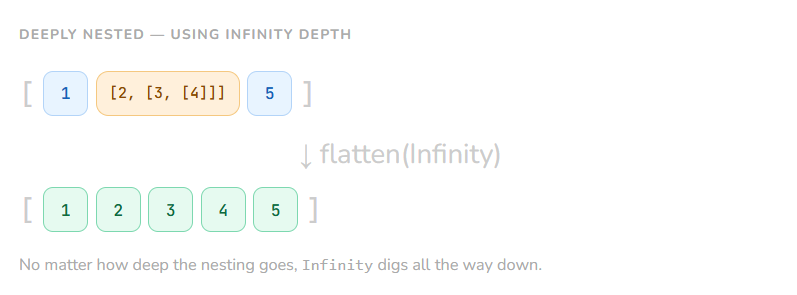
No matter how deep the nesting goes, Infinity digs all the way down.
Section 04
Ways to flatten an array
There are a few different approaches. Each one is useful in a different situation — especially in interviews.
① Array.flat()
Modern · Easiest
Built right into JavaScript. Pass a depth number, or Infinity to flatten everything.
flat.js
const arr = [1, [2, 3], [4, [5, 6]]];

arr.flat();       // [1, 2, 3, 4, [5, 6]]  — 1 level
arr.flat(2);      // [1, 2, 3, 4, 5, 6]   — 2 levels
arr.flat(Infinity); // [1, 2, 3, 4, 5, 6]   — all levels
② reduce() + concat()
Classic · Interview favourite
Manually walks through the array, concatenating each item into an accumulator. Great for understanding what flatten actually does.
reduce-flatten.js
const arr = [1, [2, 3], [4, 5]];

const flat = arr.reduce((result, item) => {
  return result.concat(item);
}, []);

console.log(flat); // [1, 2, 3, 4, 5]

// Same thing, shorter:
const flat2 = arr.reduce((r, i) => r.concat(i), []);
③ Recursive function
Deep nesting · Shows skill
For deeply nested arrays. The function calls itself whenever it finds an inner array. This is the one interviewers love to ask you to write from scratch.
recursive-flatten.js
function flatten(arr) {
  let result = [];

  for (let item of arr) {
    if (Array.isArray(item)) {
      // 👆 it's an array — go deeper
      result = result.concat(flatten(item));
    } else {
      // 👆 it's a normal value — keep it
      result.push(item);
    }
  }

  return result;
}

flatten([1, [2, [3, [4]]], 5]);
// → [1, 2, 3, 4, 5]
④ flatMap()
Map + Flatten in one go
flatMap is like doing .map() and then .flat(1) together. Useful when you're transforming and flattening at the same time.
flatmap.js
const words = ["hello world", "foo bar"];

// Split each string into words, then flatten into one list
words.flatMap(w => w.split(" "));
// → ["hello", "world", "foo", "bar"]

// Another example — double each number into pairs
[1, 2, 3].flatMap(n => [n, n * 2]);
// → [1, 2, 2, 4, 3, 6]
Section 05
Common interview scenarios
Here are the questions interviewers actually ask — and what they're really testing.
Questions to expect
Write a function to flatten a nested array without using
.flat()Flatten an array to a given depth (not all the way)
What is the difference between
flat(1)andflat(Infinity)?Use
reduce()to flatten an array — explain each stepWhat does
flatMap()do thatmap()doesn't?Handle an array where some items may not be arrays at all
🎯
The recursive approach is the most important one to know by heart. Interviewers want to see if you understand recursion — calling a function inside itself. Practise writing it without looking.
cheatsheet.js
const arr = [1, [2, 3], [4, [5]]];

// 1. Built-in — easiest
arr.flat(Infinity);

// 2. reduce — classic one-liner
arr.reduce((r, i) => r.concat(i), []);

// 3. Recursive — write this from memory
function flatten(a) {
  return a.reduce((r, i) =>
    Array.isArray(i) ? r.concat(flatten(i)) : [...r, i]
  , []);
}

// 4. flatMap — for transform + flatten together
["a b", "c d"].flatMap(s => s.split(" "));
// → ["a", "b", "c", "d"]


